CandyDocs offers flexible pricing plans to help you scale your documentation, roadmap, feedback boards, and API references as your product grows.
This guide will walk you through how to subscribe or upgrade your plan directly from the dashboard.
Step 1: Open the Subscription Page
Log in to your CandyDocs Admin Dashboard.
From the left sidebar, click on Subscription.
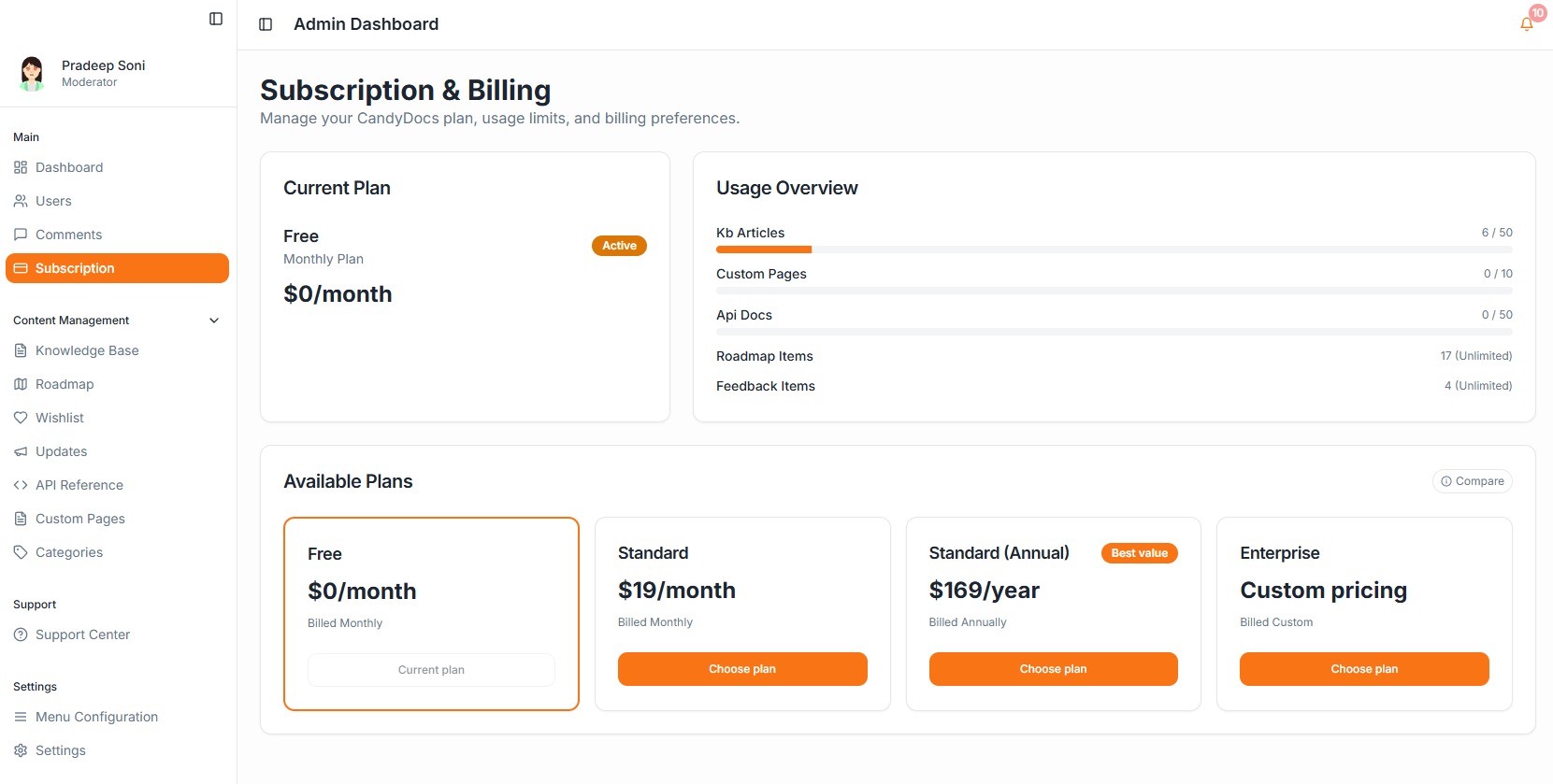
This will open the Subscription & Billing page where you can:
View your current plan
Check usage limits
Compare available plans
Upgrade or switch plans
Step 2: Review Your Current Plan
At the top of the page, you will see:
Current Plan
Plan name (e.g., Free, Standard, Enterprise)
Billing type (Monthly or Annual)
Plan status (Active)
Pricing details
This section helps you understand what plan you’re currently on and whether you need to upgrade based on usage.
Step 3: Check Your Usage Overview
Before upgrading, review your usage limits.
The Usage Overview section shows:
Knowledge Base Articles used vs limit
Custom Pages usage
API Docs usage
Roadmap items
Feedback items
If you're approaching limits, it’s a good time to upgrade.
Step 4: Compare Available Plans
Scroll down to the Available Plans section.
Here you will see options like:
Free (Monthly)
Standard (Monthly)
Standard (Annual – Best Value)
Enterprise (Custom pricing)
Each plan displays:
Price
Billing frequency
Upgrade button
If you're on the Free plan, you’ll see it marked as your current plan.
Step 5: Choose a Plan
Click Choose Plan under the plan you want to subscribe to.
You will be redirected to the secure checkout process where you can:
Enter billing details
Complete payment
Confirm subscription
Once payment is successful, your plan will automatically update.
Step 6: Confirm Plan Activation
After subscribing:
Your new plan will appear as Active
Usage limits will update instantly
Premium features will become available immediately
You can return to the Subscription page anytime to review billing information.
Monthly vs Annual Plans
CandyDocs offers both monthly and annual billing options.
Monthly Plan
Flexible
Cancel anytime
Pay month-to-month
Annual Plan
Discounted pricing
Best value for long-term usage
Lower effective monthly cost
Choose the option that best fits your growth stage.
Upgrading or Downgrading Later
You can change your plan anytime from the Subscription page.
Upgrades take effect immediately.
Downgrades may apply from the next billing cycle depending on your billing status.
Need Enterprise?
If you require:
Higher usage limits
Advanced privacy controls
Custom integrations
Dedicated support
Select the Enterprise plan and contact the CandyDocs team for custom pricing.
Final Thoughts
Subscribing to a CandyDocs plan is quick and seamless. As your product scales, upgrading ensures you have the flexibility and capacity to manage documentation, roadmaps, and feedback without limits.
If you're just starting out, the Free plan is perfect.
When you’re ready to grow, upgrading takes just a few clicks.